Shein Free Trial Program: A Practical Walkthrough
Practical Shein Free Trial Center checklist: categories, applying, tracking requests, sending trial reports and correcting rejected reviews.
Advertisement
Use the Free Trial Center to request products featured in specific campaigns. Keep in mind that picking an item and sending the request only opens the process.
How would you like to receive it?
Select the option that suits you best.
Everything about the program happens inside the Shein app: you choose the items, and Shein reviews each request and decides who is selected. If you are picked, you still need to test the product and post a review within the stated period.
This guide is informational only and is not affiliated with Shein. We don't collect any personal data or process applications, and we can't influence Shein's decisions. Understanding each step in advance helps you avoid missed deadlines and other common mistakes.
Open the area reserved for trials
Start by signing in to your account and locating the Free Trial Center. Inside the app, follow Profile → More Services → Other Services → Free Trial Center. This area lists the products with campaigns running at that time.
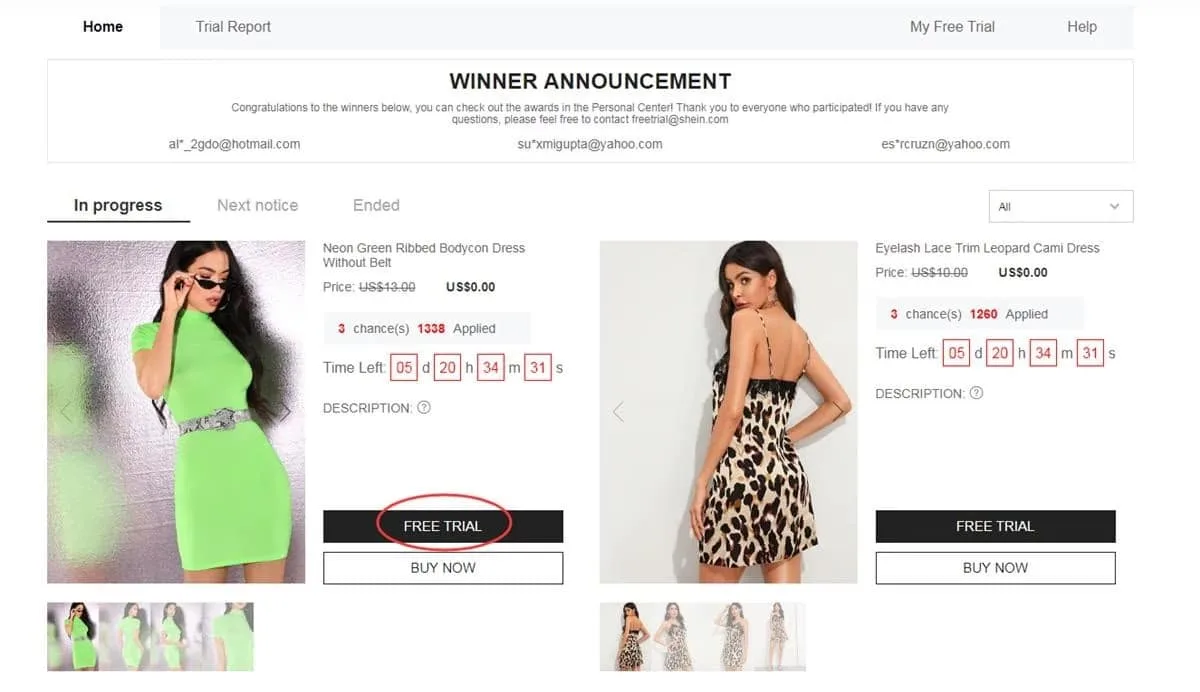
Visit this area to browse campaigns currently accepting entries
Select the products you wish to test
Submit no more than 3 applications per week. Any choices left unused in the current cycle are not kept for later. Before selecting a product, verify the size and confirm that your saved address falls within the region covered by your store.
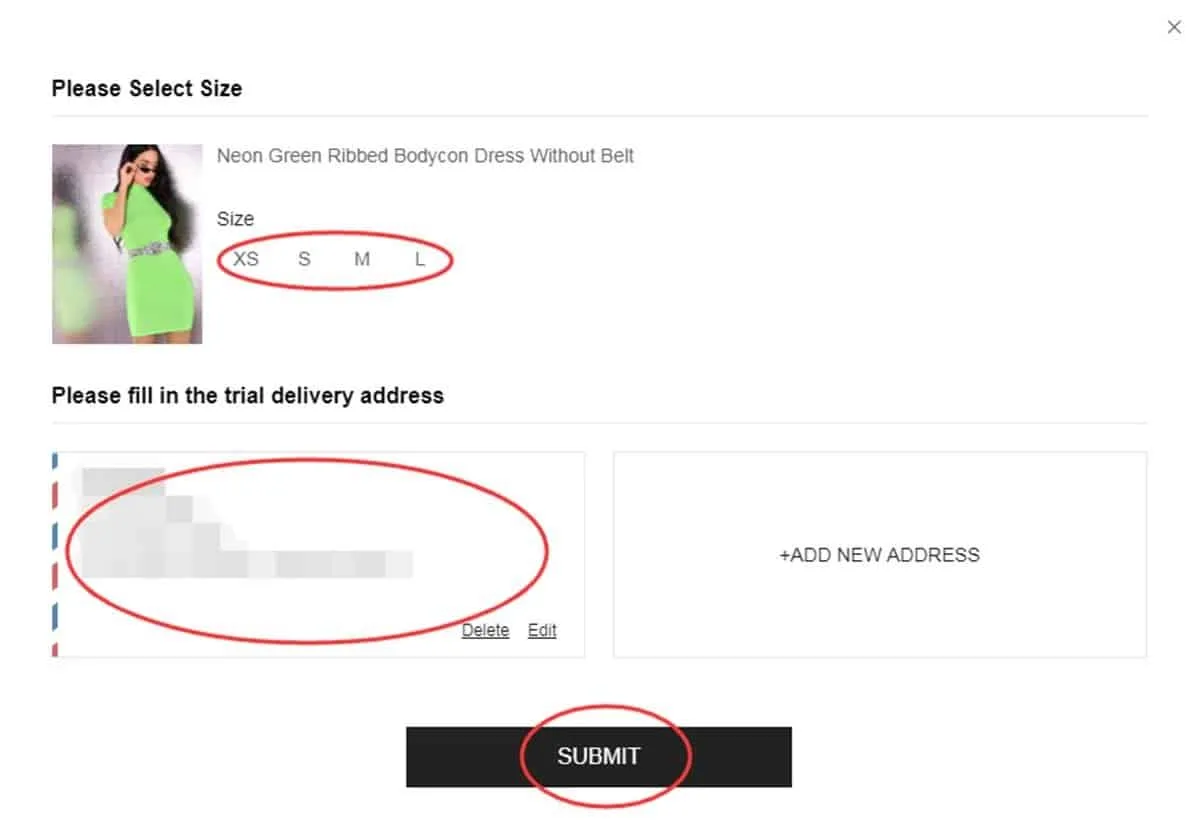
Verify your selection and shipping details before sending the request
Monitor your application status
Once submitted, monitor your entry under “My Free Trial” or “My Applications”. Allow about a week for the result. An “Approved” status confirms you were chosen for that trial, while “Failed” indicates the request was not picked this time.
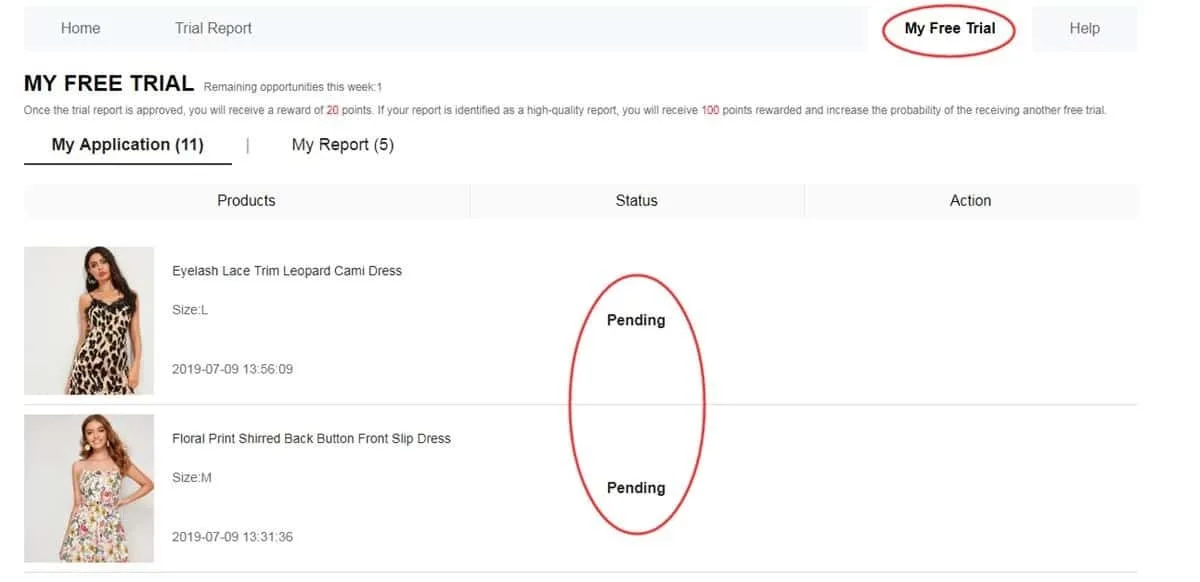
Review the history to identify which requests advanced
Evaluate the item on arrival
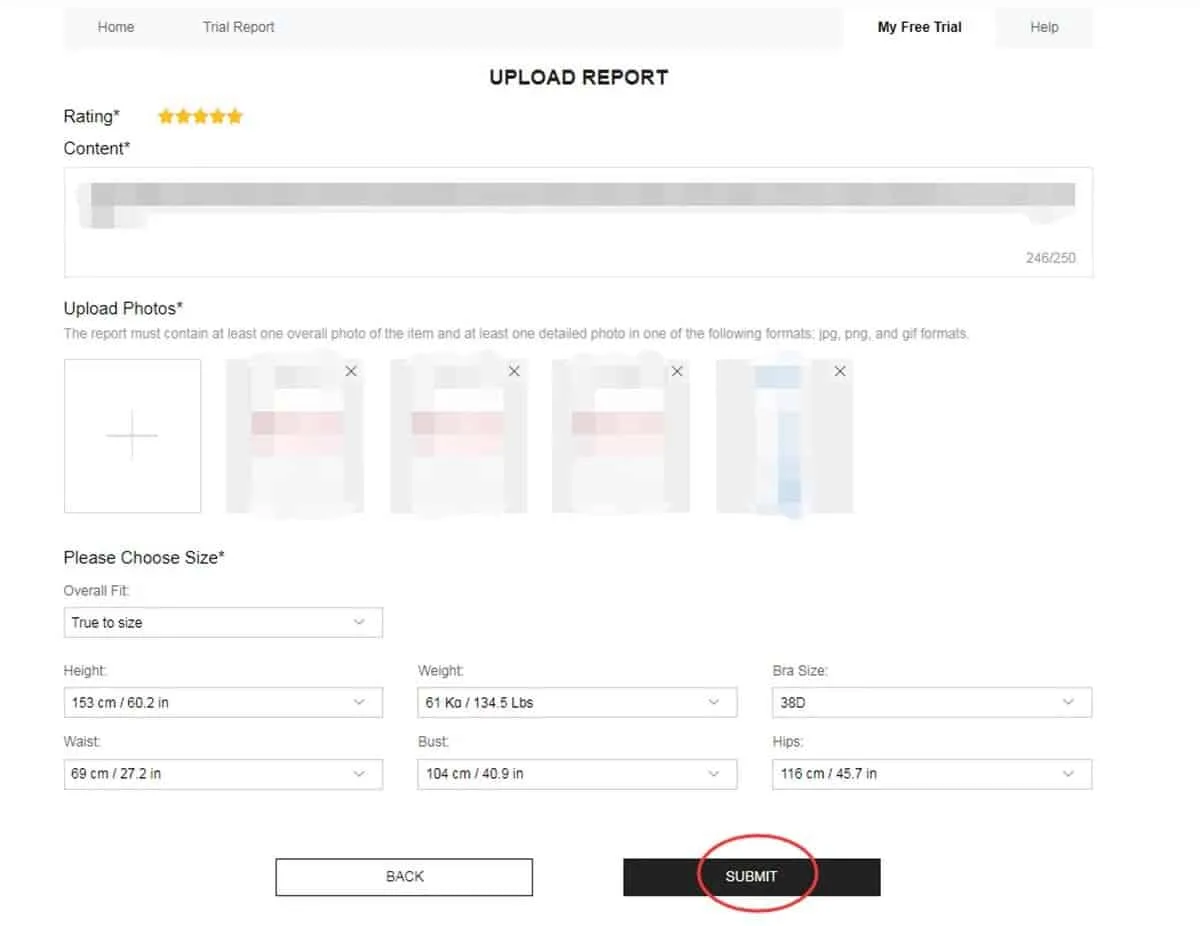
Once the approved product reaches you, use it before drafting your report. Assess material, finish, comfort, size, look and general quality. Base the review on genuine use, attach photos you took yourself and send it within the deadline of up to 10 days.
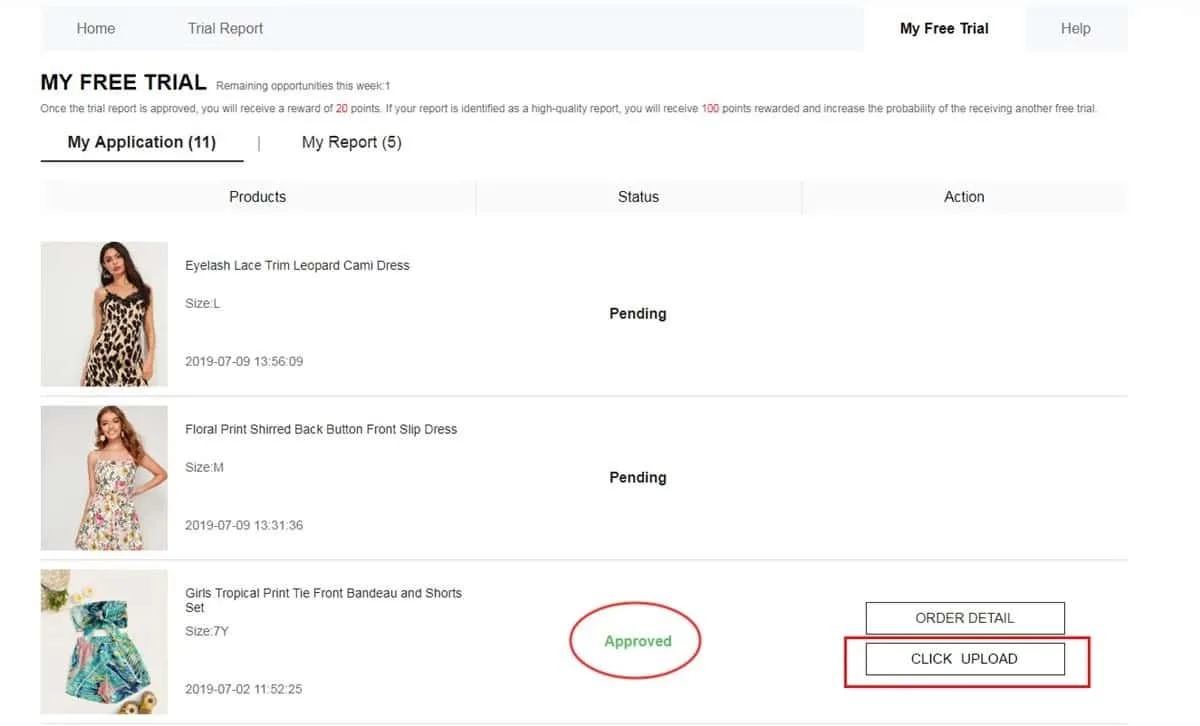
Submit a thorough review with original photos of the product
Confirm the report was accepted
After completing your review, open My Report to view the outcome. An approved report typically credits 20 points to your account. A review also rated as a “High-Quality Report” may earn a further 100 points. This reward does not ensure automatic approval in later campaigns.
Use this section to view the review outcome and the points it earned
Apply corrections when a new chance appears
Some reviews are not approved on the first pass. If the report displays Failed, look for the Rewrite option. When it is offered, edit the text, add useful details and swap out photos that are dark, blurry or fail to show the product clearly.
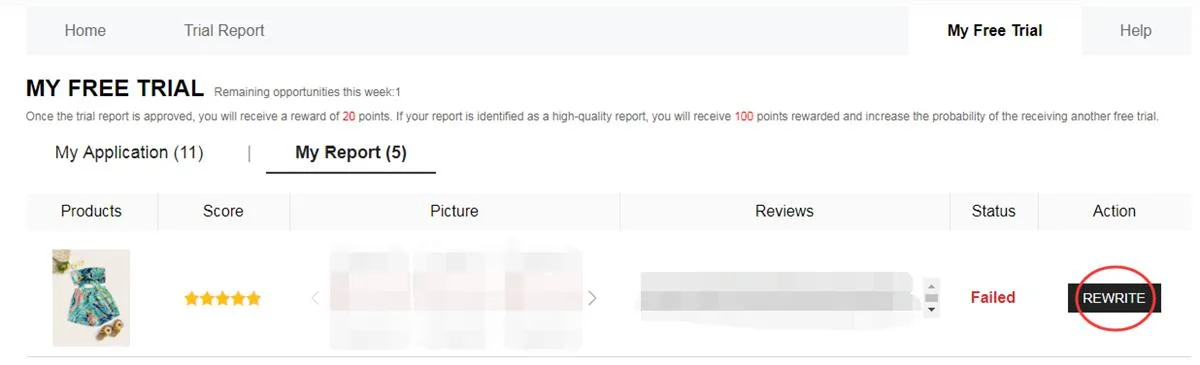
Once enabled, the Rewrite option allows you to fix the content and resubmit it
What occurs from application to review?
Start by browsing open campaigns and picking the products that interest you. The catalog shifts over time, so items listed one week may not appear in the following round.
Next, the request enters review. No delivery is confirmed at this stage, since every application depends on the outcome displayed later in your dashboard.
Upon approval, the product ships to the address given at registration. Once it arrives, the testing and evaluation stage starts, and the participant should examine the product's various features.
Finally, submit the report. Meet the deadline, and write original, helpful content with images that accurately show the item you received.
Which categories may appear in campaigns?
The product mix varies with each period's availability, but the catalog may include several segments:
- Apparel: t-shirts, dresses, jeans, blouses, coats, activewear and other clothing items.
- Beauty & care: skincare, makeup and products for your daily personal care routine.
- Style accessories: shoes, bags, jewelry, fashion accessories and other style-related pieces.
- Home & organization: decorative items, utensils, organizers and products for various rooms.
A past rejection does not mean upcoming requests will end the same way.
Treat each new round as a chance to update your details and apply with accurate information.
How do you make a review more useful?
A strong report does more than state whether the product pleased you. Record specific details from your experience:
• Describe what worked well and note features that could be better.
• Address points such as size, material, finish, comfort and actual look.
• Add your own photos, taken in good light from angles that show the item clearly.
• Include notes that may help others thinking about buying the same product.
Errors that can weaken your entry
Run a quick check before finishing each step to prevent these issues:
❌ Leaving key profile data incomplete or out of date.
❌ Entering a delivery address outside the region of the chosen store.
❌ Confirming an item without verifying the size and other listed details.
❌ Submitting a shallow report that does not describe your experience with the item.
❌ Uploading poor-quality photos or images where the product is hard to see.
❌ Letting the deadline of up to 10 days for the review pass.
❌ Skipping the chance to fix the report when the Rewrite option is available.
❌ Providing data that does not reflect the actual details required to participate.
Essential program details
• Applications are capped at 3 per week, and leftover choices do not move to another cycle.
• Your address must correspond to the country or region of the store where you placed the request.
• The program pays for standard shipping, but customs rules and potential fees can differ by destination.
• Once the item is delivered, a fixed period applies for completing and sending the requested report.
• A declined review may be given the Rewrite option, allowing edits before it is analyzed again.
• Supplying false data or misusing accounts can lead to restrictions or a block on future entries.
• Every participant is responsible for completing each step correctly and for finishing the required reports.
Questions people often ask
Does sending an application cost anything?
No payment is needed to request a product through the Free Trial Center. Still, sending an application does not ensure selection.
What is the weekly request limit?
The program allows up to 3 products per weekly cycle. Any options left unused are not carried over to the next week.
Can a rejection stop me from applying again?
No. A request that was not chosen counts only for that particular opportunity. Keep watching new campaigns and submit further requests whenever products are listed.
How can I tell if my review needs fixing?
Open the My Report section. If the review appears as Failed and the Rewrite option is offered, edit the content and resubmit it.
Need a closer look at every step?
Learn to navigate the Free Trial Center, monitor your applications and prepare your review properly if you are chosen.


