Shein Free Trial Center: Steps to Raise Your Odds
Full Shein Free Trial Center checklist: apply, monitor results, send reviews within 10 days and use the Rewrite option when needed.
Advertisement
Free Trial Center Tactics: Steps to Raise Your Selection Odds
Available spots are scarce. Using the wrong procedure leads the system to set your profile aside. Apply the proven steps below.
Advertisement
Independent Reference Guide This review draws on publicly available information about the Shein Free Trial Center. We hold no commercial ties or official affiliation with the brand. Candidate selection is highly competitive, and final approval is never guaranteed. Read the terms of each selection before you apply.
Why Most Requests Get Rejected
Each week, the distribution dashboard processes a high number of applications. Many users are filtered out for incomplete profiles, late applications, delivery addresses that do not match the store's country, or shallow, photo-free reviews after the products arrive.
To build a stronger profile in the system, keep a steady routine: fill in your personal details, submit requests as soon as each period opens and write detailed reviews every time. Selection follows strict criteria.
Defining the Sample Program
This area serves as Shein's official quality control hub. Chosen members get products free of charge and commit to writing an honest review based on actual use. Once a request is approved, a free order is generated and dispatched automatically.
Spots are scarce and refreshed constantly. Access is never guaranteed; your overall activity record, how fast you apply and the quality of past reviews decide your eligibility for upcoming campaigns.
Typical Catalog Product Categories
The selection of items spans multiple consumer sectors. Since stock is renewed continuously, the catalog tends to mix current fashion trends with everyday essentials awaiting review.
Beyond apparel, the dashboard frequently lists beauty and personal care products, home accessories and contemporary decor pieces.
Categories Highlighted on the Dashboard:
Access the trials area
Sign in to your account on the website or mobile app and open the trial section. On mobile, the usual path is: Profile → More Services → Other Services → Free Trial Center. Browse the catalog offered for the current cycle.
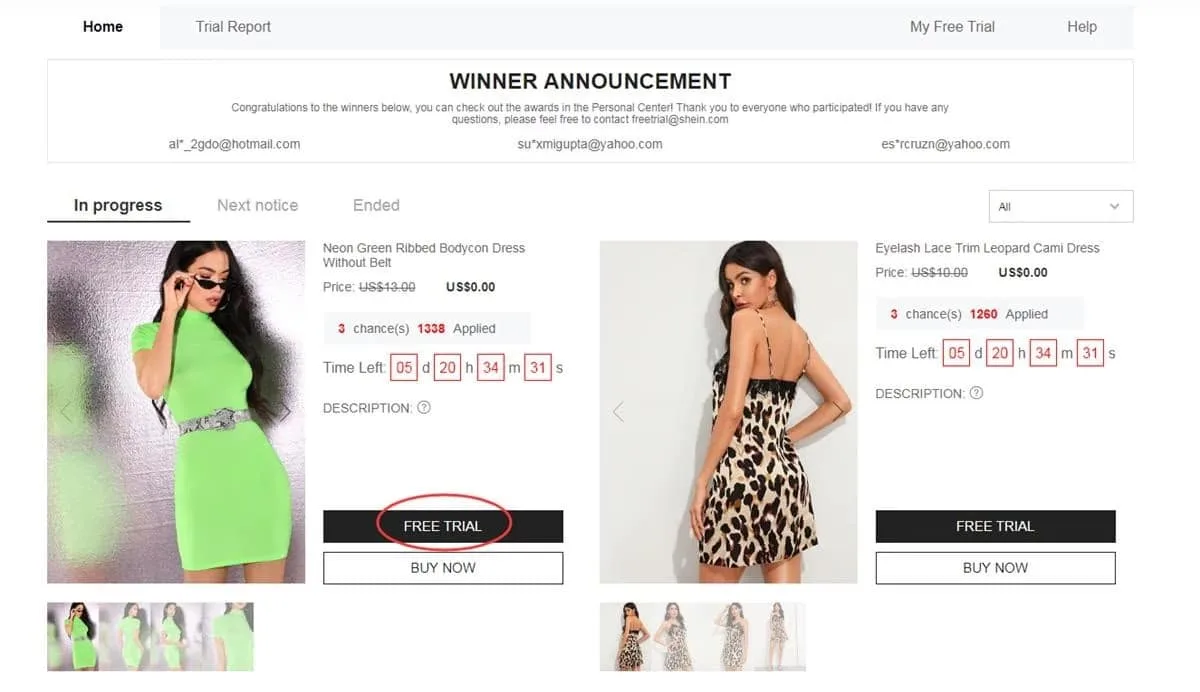
Official route within your account's services panel
Pick up to 3 items per week
A firm cap of 3 selections per week applies (unused spots expire and do not build up). Click the trial option, pick the right size, confirm a delivery address inside the active store's country and send the form. An invalid delivery address causes the request to be rejected.
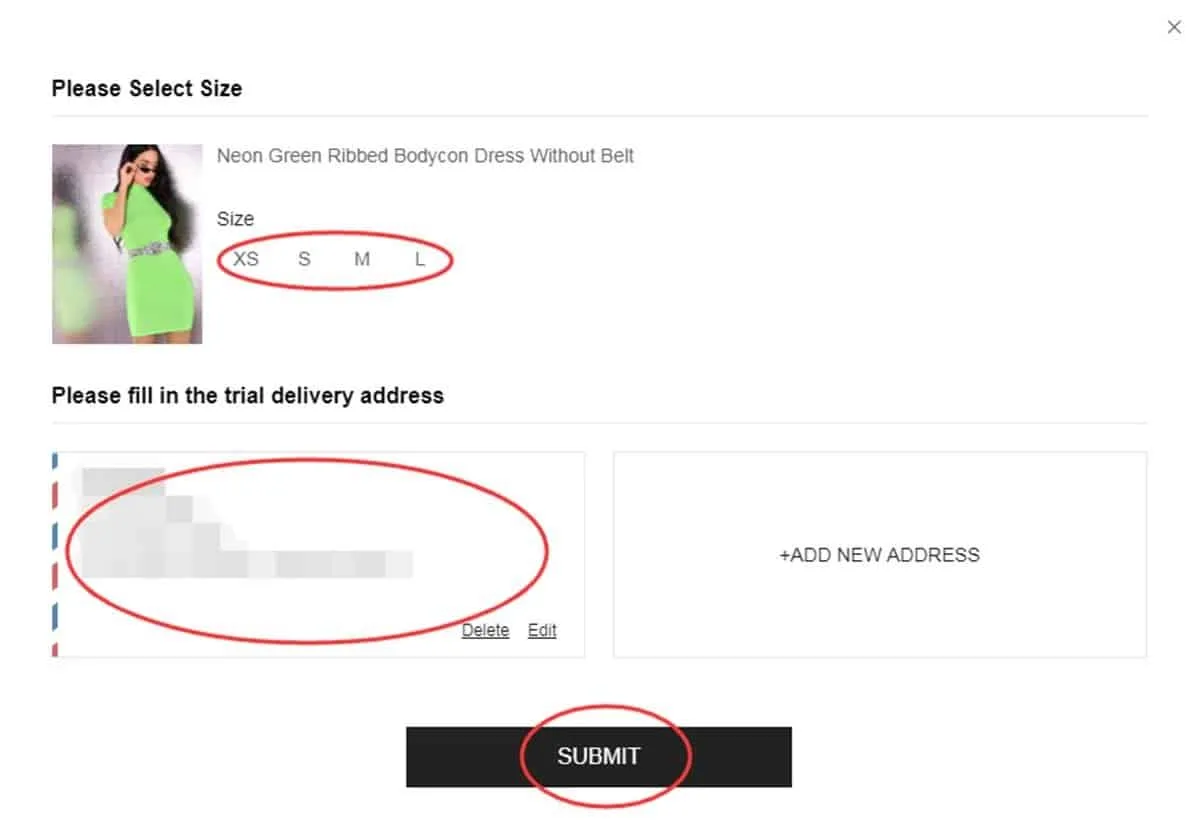
Verifying sizes and the shipping location
Monitor the system's decisions
Processing the final decision typically takes about a week. Open “My Free Trial / My Applications” to view the status. An “Approved” label confirms your selection and that your free shipment is underway; “Failed” means your request was not accepted on this occasion.
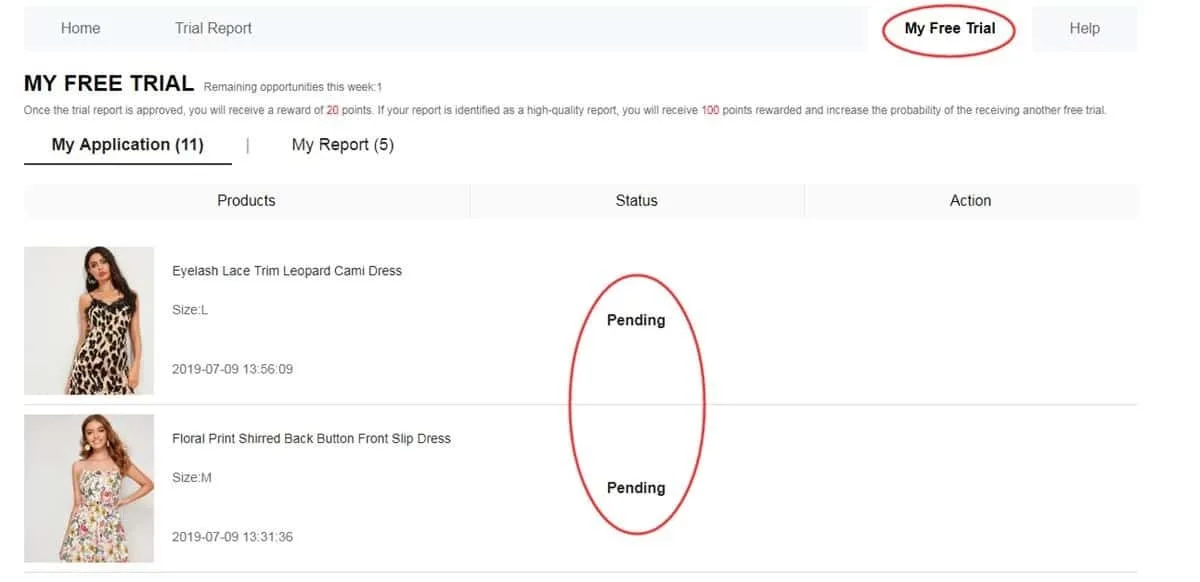
Internal panel for tracking approvals and rejections
Send your review within 10 days
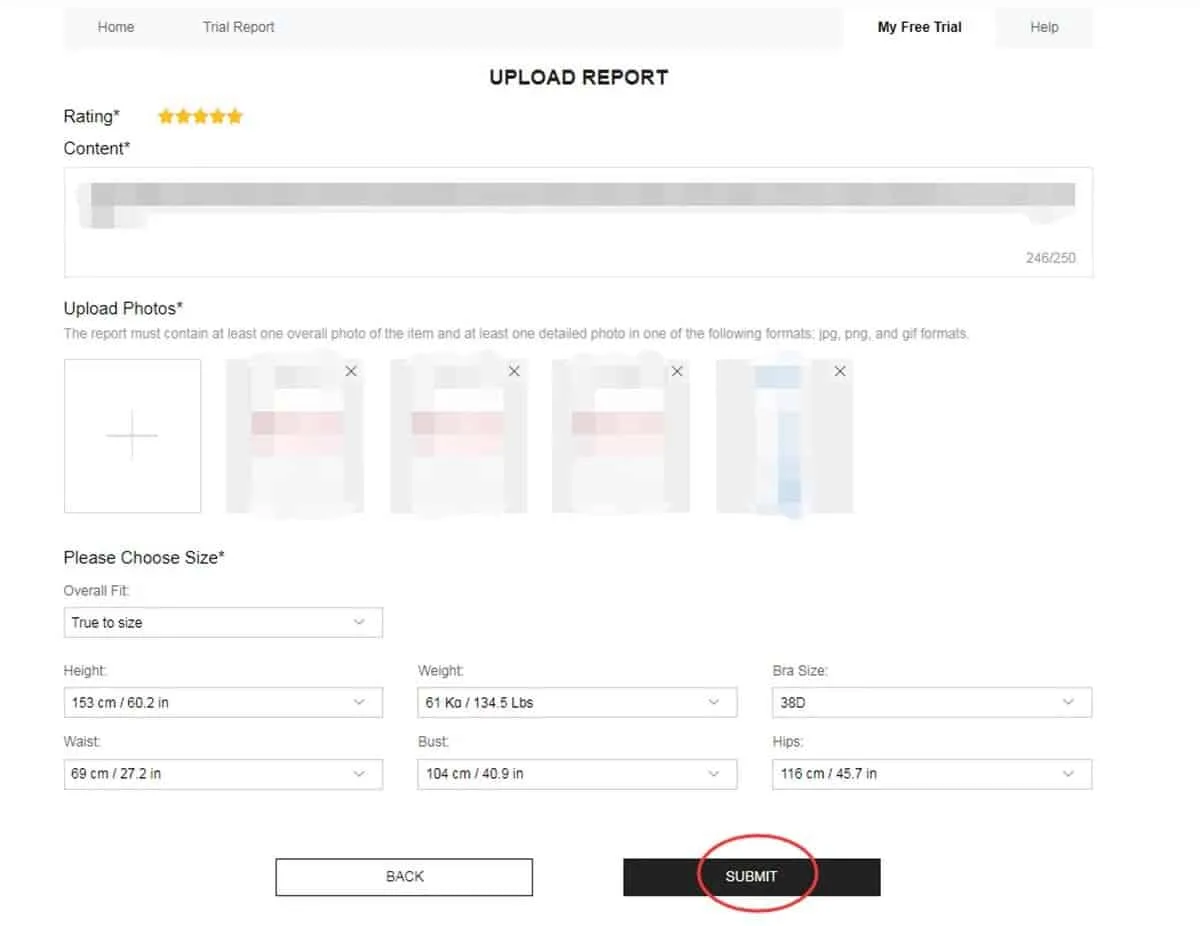
Once the package arrives, use the product to assess its quality, design, fit, fabric and durability. Write a thorough review with clear photos (one full-body shot and two close-ups are recommended). Send it via the corresponding button and monitor it in “My Report”. Aim to finish before the 10th day.
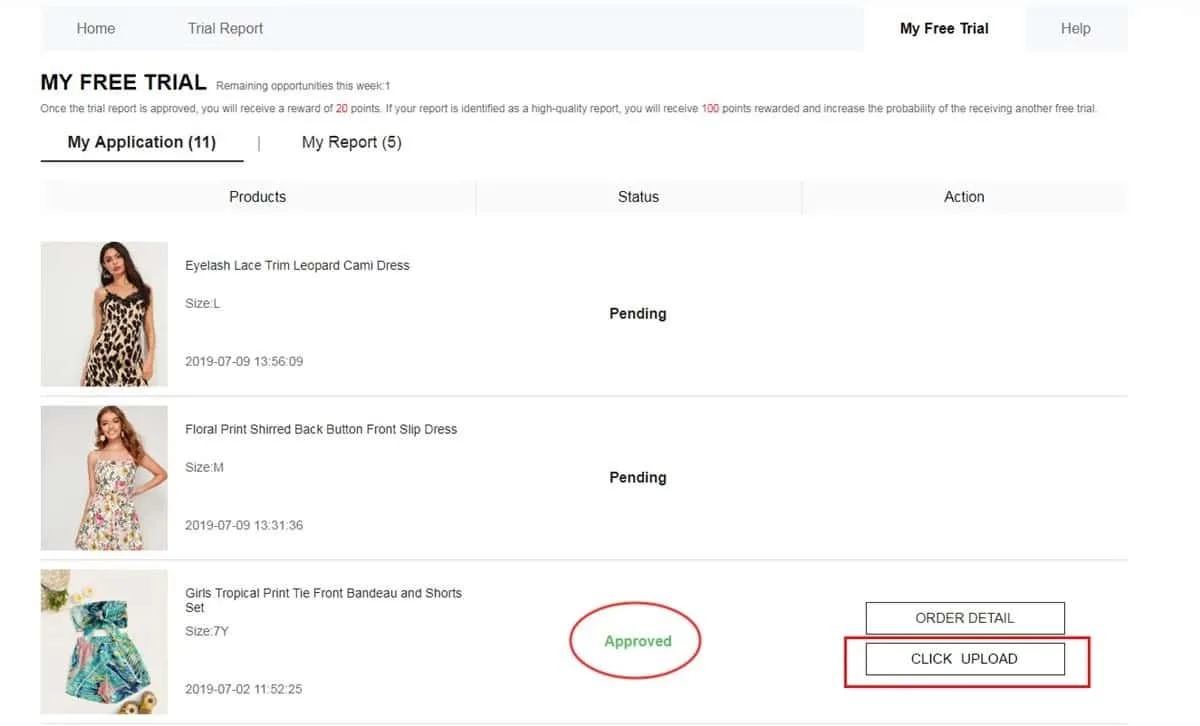
Official platform for uploading written reviews and photos
Review My Report and your points
Once your review is sent, open My Report to confirm it was recorded. An approved review typically earns 20 points. A review rated by the system as a “High-Quality Report” earns 100 additional points. These points do not secure future approvals; they simply reflect your participation record.
Panel for checking your report status and rewards received
Correct your report if marked Failed
Should your report's status switch to Failed, the rules generally grant one extra opportunity to edit it. Inside My Report, locate the Rewrite option. Apply it to strengthen the text (quality, style, fit, fabric and finish), swap blurry photos and resubmit before the deadline. Never leave a rejected report unfixed, since this may impact your future selections.
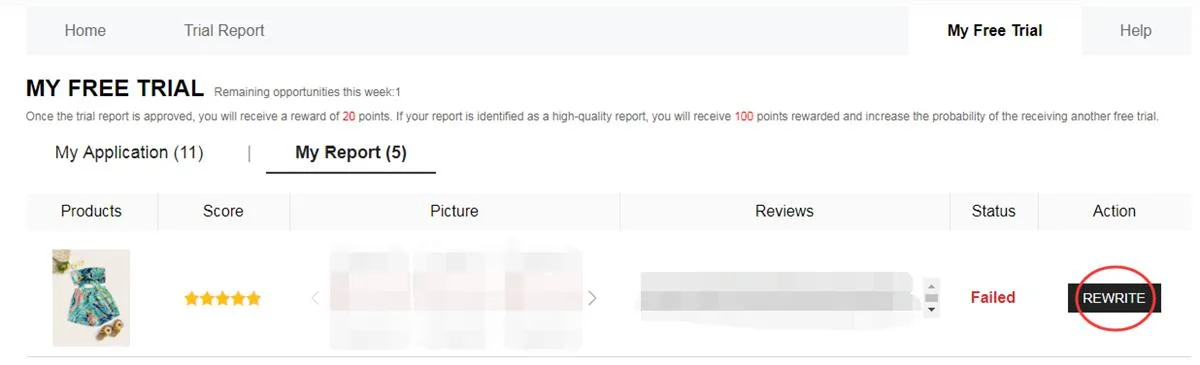
My Report screen showing Failed status and the Rewrite option for resubmitting
How to Structure a Valuable Review:
To satisfy the moderation filters, successful reviews should contain:
Points Breakdown: Each approved review typically credits 20 points to your account. A review rated as a “High-Quality Report” earns 100 extra points to use on your purchases.
Improper Actions That Lower Your Chances
Steer clear of these errors to protect your internal profile:
❌ Leaving your account profile out of date or missing your body measurements.
❌ Entering a delivery address outside the geographic region of the active store.
❌ Applying once the weekly campaigns are underway.
❌ Posting generic, very brief texts with no descriptive detail or real photos.
❌ Letting the 10-day deadline for your mandatory report expire.
❌ Ignoring the Rewrite option on a report with Failed status when the system provides it.
❌ Staying away from the app for long stretches and coming back only to collect benefits.
Frequently selected participants tend to share one routine: a complete profile, requests placed the moment weekly windows open, a confirmed address and detailed, on-time reviews with authentic photos.
— Slatevora editorial note
Key Conditions to Keep in Mind
• Maximum of 3 attempts per weekly cycle (unused spots do not roll over).
• Your delivery address must match the region of the active web store's country exactly.
• Standard shipping costs are paid by the company; customs fees may still apply depending on the destination country.
• Every review must be sent within 10 days of the package's arrival.
• A review marked Failed usually gets one extra chance (Rewrite) for corrections.
• Supplying false information or running several accounts on one device can lead to a permanent block.
• Late or missing feedback directly reduces your chances in upcoming selections.
Questions Often Asked (FAQ)
Do I pay anything for product shipping?
No, the platform pays all standard shipping costs. Participants should only watch for potential customs fees or local regulations.
How many catalog items can I request at once?
Apply for up to 3 different items per weekly round. Unused credits expire and are not transferred to the following cycle.
What occurs if my review is rejected?
The status in My Report may display Failed. The Rewrite option is usually provided so you can fix the text and photos before resubmitting. Check the content and image requirements before sending it again.
Must I return the products after reviewing them?
No. Under the standard program rules, you keep the products you receive once your review is submitted and validated. Read each campaign's specific terms carefully.
Popular items run out of spots fast. Members with steady results check the dashboard as each campaign starts, log their choices promptly and submit — or fix — their reviews before the set deadline.
Visit the Official Free Trial Center Dashboard
Explore this week's options, apply in the correct order and track every stage.
You will be securely redirected to the platform's official trial environment.
Reference source and help channel: Shein Free Trial Help Center


